
SMART Estimator App
SMART Estimator LtdAuto & Vehicles
2.626.00 Reviews
- Version
- 4.9
- Installs
- 10.00K
- Age Rating
- Everyone
Screenshots
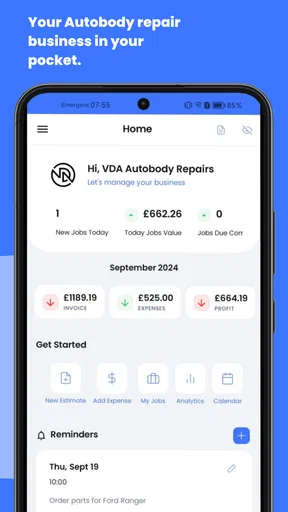
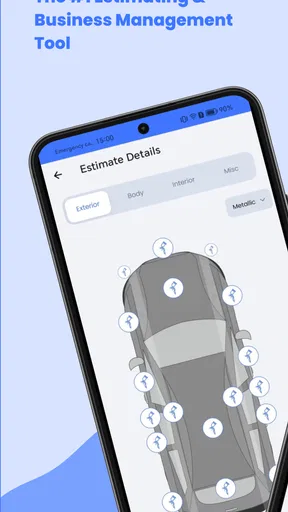
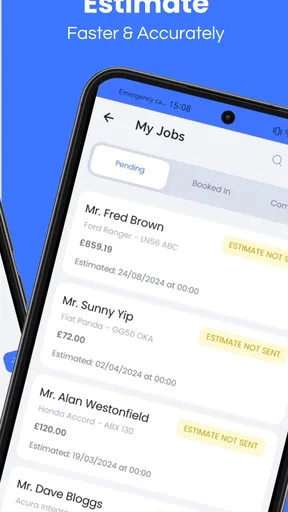
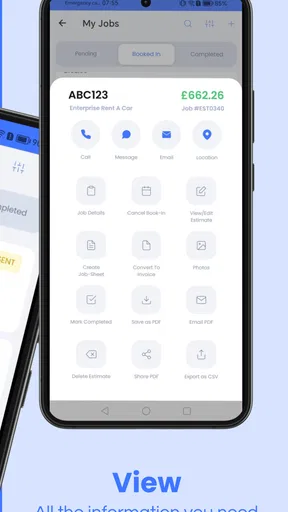
Our Review of SMART Estimator App
 Analysis by Appyee
I look at SMART Estimator as a specialist tool for the parts of collision repair that are easy to let scatter across paper notes, spreadsheets, and conversations: preparing an estimate, turning repair work into an invoice, and keeping business details together. That focus matters. This is not a general-purpose home-project calculator, and I would not choose it for landscaping or construction simply because those examples appear in the older overview below. Its place is the auto body shop, where a clear record of repair work can matter as much as the calculation itself.
Where it fits in a repair shop’s day
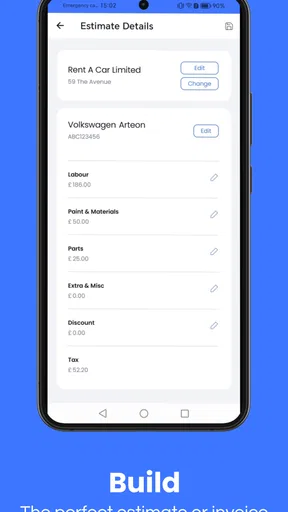
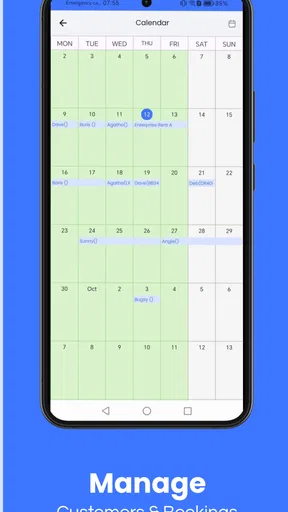
The useful question is not just whether an app can add labor and materials. It is whether it helps a shop move from a vehicle inspection to a customer-facing estimate and then keep the job organized as the work progresses. That is the kind of workflow SMART Estimator is aimed at. I can see it suiting an independent repairer or a small team that wants estimating, invoicing, and business management in one app rather than maintaining separate tools for each task.
Picture a customer arriving with a damaged bumper. The practical first step is to record the repair details while the vehicle is in front of you, then review the figures before discussing the job. A mobile workflow can be useful here because the estimate starts at the point of inspection instead of being reconstructed later from hurried notes. I would still take time to check every line before sharing it: the app can organize your inputs, but your inspection and judgment determine whether those inputs describe the repair accurately.
Choosing it over a spreadsheet or a broader shop system
A spreadsheet can be flexible and familiar, especially for a shop that already has a carefully maintained estimating template. Its weakness is that the user has to build and preserve the workflow: consistent fields, invoice records, and a clear handoff between a quote and the completed job. A purpose-built app can reduce that friction, but it is only a better choice if its way of handling estimates matches how your shop works.
At the other end, a larger shop-management system may be a better fit for a business that needs a connected process across many staff members or wants its existing back-office routines reflected in one environment. I would not assume SMART Estimator replaces every specialist system. Its appeal is more focused: an auto body repairer can evaluate whether having estimating and invoicing together is enough to make the daily workflow simpler. Before moving active jobs into it, I’d test a typical repair from initial notes through the customer document and final invoice, and compare the result with the format your customers already understand.
Small habits that make estimates more dependable
The best shortcut in estimating is usually a repeatable habit, not a hidden button. I’d settle on a consistent order for reviewing a job—for example, record the visible damage, list the work that follows from the inspection, check labor and material entries, and then read the total as if I were the customer seeing it for the first time. That final pass can catch unclear wording or an omitted task before the estimate becomes an awkward conversation.
For repeat repairs, I would use the app’s project organization to keep prior work available as a reference, while treating each new vehicle as its own inspection. Reusing a familiar structure can save time; copying figures without checking condition, parts, or scope can create a misleading estimate. A short, consistent note about why a line item was included can also help when you return to a job after a busy day or need to explain the work to a colleague.
Costs, expectations, and who should pause before switching
The app is free to install, but it includes in-app purchases listed from about fifteen to forty dollars per item. I’d check what the relevant purchase covers and whether it suits the shop’s workflow before relying on a paid option. That is especially important if you are comparing it with a spreadsheet you already own or a system whose costs are already part of your business routine.
SMART Estimator is rated for everyone, runs on Android from version nine, and is at version 4.3. It has passed ten thousand installs, while its average rating is 2.5 from about eighty-five ratings, with around twenty-five written reviews. I take that rating as a reason to test the actual workflow carefully rather than as proof that the app will or will not work for a particular shop. The developer is SMART Estimator Ltd, and the app was released on January 6, 2021.
I would be cautious about switching during a packed repair schedule. Try a representative job first, check whether the estimate and invoice are easy to review, and make sure the rest of the team can follow the same process. Shops that depend on a very specific existing document format, extensive integrations, or a carefully customized spreadsheet may be happier staying with their current setup unless the app demonstrably covers those needs.
Getting Started with SMART Estimator
First off, downloading the SMART Estimator App is a breeze. Whether you're on Android or iOS, it's available for free on both platforms. Once installed, the app greets you with a clean, user-friendly interface. There’s something quite refreshing about an app that doesn’t overwhelm you with too many options right off the bat.
Upon opening the app, you’re prompted to set up a new project. The process is straightforward: name your project, pick a category (like construction, landscaping, etc.), and you’re good to go. The app then guides you through inputting details like materials and labor costs. It’s intuitive enough that even if you’re not tech-savvy, you’ll feel right at home.
The Estimation Process
This is where things get interesting. The app uses a combination of pre-set data and your own inputs to calculate estimates. You’re required to enter specifics such as the type and quantity of materials, hourly labor rates, and any additional expenses you might incur. What I loved here was the ability to customize categories and add notes. This flexibility means you can tailor each estimate to fit your unique needs.
Once all the data is in, the app crunches the numbers and presents you with a detailed cost breakdown. It doesn’t just stop there; you can also view a summary report that highlights the most significant expenses. This feature is particularly handy for visualizing which aspects of your project might need adjustments to stay within budget.
Features That Stand Out
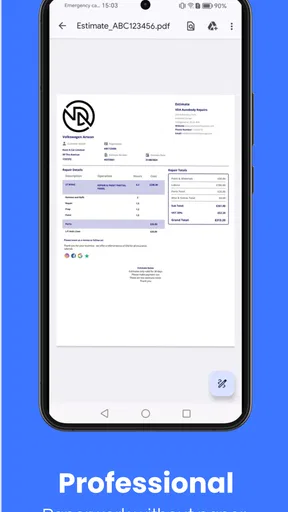
One of the standout features of the app is its ability to save and export estimates. You can save your projects in the app and revisit them anytime. Plus, with the export feature, you can generate PDF reports to share with clients or team members. This function is a lifesaver for keeping everyone on the same page.
The app also offers a cloud synchronization feature. This means you can access your projects from multiple devices. Whether you're working from your smartphone on-site or from a tablet in the office, your data stays up-to-date and accessible.
Room for Improvement
While the app is pretty impressive, it’s not without its quirks. During my testing, I noticed that the app occasionally lagged when dealing with large data sets. It’s not a dealbreaker, but it’s something to be aware of, especially if you’re managing a big project.
Additionally, some users might find the initial setup a bit tedious. Entering detailed material and labor information can be time-consuming, especially if you’re new to estimating. However, once you’ve got your first project set up, future ones become much easier to manage.
Wrapping Up
All in all, the SMART Estimator App is a solid tool for anyone needing to streamline their project estimations. It’s intuitive enough for beginners yet robust enough to meet the needs of seasoned professionals. While it has a few areas that could use polishing, the benefits far outweigh any minor inconveniences. If you’re in the market for an estimation app that keeps you organized and efficient, give SMART Estimator a try. It might just be the trusty sidekick you’ve been looking for.
Ready to dive in? You can download the app from the links provided on our website and start estimating like a pro!
Verdict
Strengths of SMART Estimator App
- User-friendly interface, easy navigation.
- Accurate cost estimates for projects.
- Supports multiple project types.
- Integrates with other tools seamlessly.
- Regular updates with new features.
Limitations of SMART Estimator App
- Limited to certain industries.
- Requires internet for full features.
- Subscription model can be pricey.
- Occasional bugs in updates.
- Steep learning curve for beginners.
Similar Picks in This Category
View All
Android Auto
Google LLC4.1

maxim — order a taxi & food
PT. SITO4.7

Штрафы ГИБДД: проверка с фото
Pays LLC – Штрафы ГИБДД4.7

Номерограм – проверка авто
Авто Ассист4.8

Дром Авто
Дром4.9

Frequently Asked Questions
What is the SMART Estimator App and how does it work?
The SMART Estimator App is a powerful tool designed for professionals looking to streamline their estimating process. It allows users to create accurate project estimates by inputting specific data related to materials, labor, and other costs. The app uses advanced algorithms to provide quick and reliable estimates that can be easily adjusted as project requirements change.
Is the SMART Estimator App suitable for all types of projects?
Yes, the SMART Estimator App is highly versatile and can be used for a wide range of projects, including construction, renovation, and design. It offers customizable templates and a flexible interface, allowing users to tailor estimates to fit the specific needs and scale of any project. This makes it a valuable tool for both small and large-scale operations.
Does the SMART Estimator App integrate with other software?
The SMART Estimator App offers seamless integration with popular project management and accounting software. This ensures that users can easily export estimates, track project progress, and manage budgets without needing to manually input data across multiple platforms. This integration capability enhances workflow efficiency and reduces the risk of errors.
How user-friendly is the SMART Estimator App for beginners?
The SMART Estimator App is designed with an intuitive interface that makes it accessible for beginners. It provides step-by-step guides and tutorials to help new users get started quickly. The app also features a comprehensive help section where users can find answers to common questions and learn about advanced features as they become more familiar with the tool.
What are the subscription options available for the SMART Estimator App?
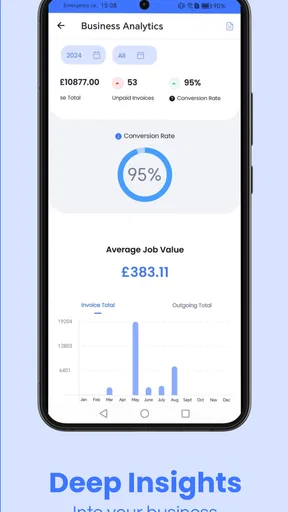
The SMART Estimator App offers multiple subscription options to suit different user needs. These typically include a basic plan with essential features and premium plans that offer additional functionality, such as advanced analytics and priority customer support. Users can choose monthly or annual billing, and there is often a free trial available to test the app's capabilities before committing to a subscription.
